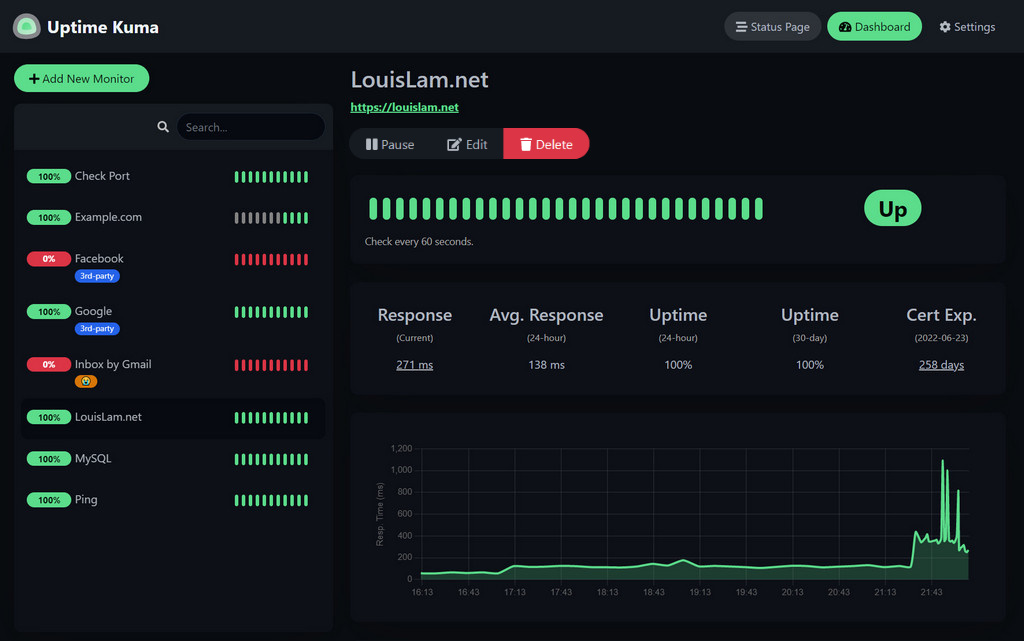
Self-hosted uptime monitoring tool with a beautiful dashboard, status pages, and multi-channel notifications.
Prerequisites
Before deploying, ensure your host environment is ready. See the Quick Start Guide for host setup instructions, including the security model for host vs. container privileges.
Deployment
Customize Paths, UID & Ports
Install and manage Uptime Kuma on FreeBSD with fjord :
install uptime-kuma
Or open the App Store in the fjord web UI and install Uptime Kuma from the wizard. New to fjord? See the Install Guide .
Database Where the app keeps its data. The default needs nothing else running.
SQLite MariaDB Your own
uptime-kuma:latest — data in /containers/uptime-kuma
A file in the app's config folder. Right for one person, nothing extra to run.
Save as compose.yaml:
name : uptime-kuma
services :
uptime-kuma :
image : ghcr.io/daemonless/uptime-kuma:latest
container_name : uptime-kuma
restart : unless-stopped
annotations :
org.freebsd.jail.allow.raw_sockets : "true"
environment :
- PUID=1000
- PGID=1000
- TZ=UTC
- UPTIME_KUMA_IS_CONTAINER=1
- UPTIME_KUMA_ALLOW_ALL_CHROME_EXEC=1
- PLAYWRIGHT_SKIP_BROWSER_DOWNLOAD=1
- DATA_DIR=/config
- UPTIME_KUMA_DB_TYPE=${UPTIME_KUMA_DB_TYPE:-}
- UPTIME_KUMA_DB_HOSTNAME=${UPTIME_KUMA_DB_HOSTNAME:-}
- UPTIME_KUMA_DB_PORT=${UPTIME_KUMA_DB_PORT:-3306}
- UPTIME_KUMA_DB_USERNAME=${UPTIME_KUMA_DB_USERNAME:-}
- UPTIME_KUMA_DB_PASSWORD=${UPTIME_KUMA_DB_PASSWORD:-}
- UPTIME_KUMA_DB_NAME=${UPTIME_KUMA_DB_NAME:-}
volumes :
- /containers/uptime-kuma:/config
ports :
- "3001:3001"
Then run podman-compose up -d.
uptime-kuma:latest · mariadb:11.4 — data in /containers/uptime-kuma, /containers/uptime-kuma/mariadb
One more container, its data in its own folder. If you already know MariaDB, or the app prefers it.
1. Save as .env and fill in what is empty:
2. Save as compose.yaml:
name : uptime-kuma
services :
uptime-kuma :
depends_on : [ mariadb ]
image : ghcr.io/daemonless/uptime-kuma:latest
container_name : uptime-kuma
restart : unless-stopped
annotations :
org.freebsd.jail.allow.raw_sockets : "true"
environment :
- PUID=1000
- PGID=1000
- TZ=UTC
- UPTIME_KUMA_IS_CONTAINER=1
- UPTIME_KUMA_ALLOW_ALL_CHROME_EXEC=1
- PLAYWRIGHT_SKIP_BROWSER_DOWNLOAD=1
- DATA_DIR=/config
- UPTIME_KUMA_DB_TYPE=${UPTIME_KUMA_DB_TYPE:-}
- UPTIME_KUMA_DB_HOSTNAME=${UPTIME_KUMA_DB_HOSTNAME:-}
- UPTIME_KUMA_DB_PORT=${UPTIME_KUMA_DB_PORT:-3306}
- UPTIME_KUMA_DB_USERNAME=${UPTIME_KUMA_DB_USERNAME:-}
- UPTIME_KUMA_DB_PASSWORD=${UPTIME_KUMA_DB_PASSWORD:-}
- UPTIME_KUMA_DB_NAME=${UPTIME_KUMA_DB_NAME:-}
volumes :
- /containers/uptime-kuma:/config
ports :
- "3001:3001"
mariadb :
image : ghcr.io/daemonless/mariadb:11.4
restart : always
environment :
- MYSQL_USER=${UPTIME_KUMA_DB_USERNAME}
- MYSQL_PASSWORD=${UPTIME_KUMA_DB_PASSWORD}
- MYSQL_DATABASE=${UPTIME_KUMA_DB_NAME}
- MYSQL_ROOT_PASSWORD=${UPTIME_KUMA_DB_PASSWORD}
volumes :
- "${DATABASE_LOCATION}:/config"
Then run podman-compose up -d.
uptime-kuma:latest · your own database — data in /containers/uptime-kuma
A database you already run, here or on another machine. Nothing extra runs; you give the address and the account.
1. Save as .env and fill in Kind, Host, Port, User, Password, Database:
2. Save as compose.yaml:
name : uptime-kuma
services :
uptime-kuma :
image : ghcr.io/daemonless/uptime-kuma:latest
container_name : uptime-kuma
restart : unless-stopped
annotations :
org.freebsd.jail.allow.raw_sockets : "true"
environment :
- PUID=1000
- PGID=1000
- TZ=UTC
- UPTIME_KUMA_IS_CONTAINER=1
- UPTIME_KUMA_ALLOW_ALL_CHROME_EXEC=1
- PLAYWRIGHT_SKIP_BROWSER_DOWNLOAD=1
- DATA_DIR=/config
- UPTIME_KUMA_DB_TYPE=${UPTIME_KUMA_DB_TYPE:-}
- UPTIME_KUMA_DB_HOSTNAME=${UPTIME_KUMA_DB_HOSTNAME:-}
- UPTIME_KUMA_DB_PORT=${UPTIME_KUMA_DB_PORT:-3306}
- UPTIME_KUMA_DB_USERNAME=${UPTIME_KUMA_DB_USERNAME:-}
- UPTIME_KUMA_DB_PASSWORD=${UPTIME_KUMA_DB_PASSWORD:-}
- UPTIME_KUMA_DB_NAME=${UPTIME_KUMA_DB_NAME:-}
volumes :
- /containers/uptime-kuma:/config
ports :
- "3001:3001"
Then run podman-compose up -d.
Database Where the app keeps its data. The default needs nothing else running.
SQLite MariaDB Your own
uptime-kuma:latest — data in /containers/uptime-kuma
A file in the app's config folder. Right for one person, nothing extra to run.
# appjail-director.yml
options :
- virtualnet : ':<random> default'
- nat :
services :
uptime-kuma :
name : uptime_kuma
options :
- container : 'args:--pull'
- expose : '3001:3001 proto:tcp'
- template : !ENV '${PWD}/template.conf'
oci :
user : root
environment :
- PUID : !ENV '${PUID}'
- PGID : !ENV '${PGID}'
- TZ : !ENV '${TZ}'
- UPTIME_KUMA_IS_CONTAINER : !ENV '${UPTIME_KUMA_IS_CONTAINER}'
- UPTIME_KUMA_ALLOW_ALL_CHROME_EXEC : !ENV '${UPTIME_KUMA_ALLOW_ALL_CHROME_EXEC}'
- PLAYWRIGHT_SKIP_BROWSER_DOWNLOAD : !ENV '${PLAYWRIGHT_SKIP_BROWSER_DOWNLOAD}'
- DATA_DIR : !ENV '${DATA_DIR}'
- UPTIME_KUMA_DB_TYPE : !ENV '${UPTIME_KUMA_DB_TYPE}'
- UPTIME_KUMA_DB_HOSTNAME : !ENV '${UPTIME_KUMA_DB_HOSTNAME}'
- UPTIME_KUMA_DB_PORT : !ENV '${UPTIME_KUMA_DB_PORT}'
- UPTIME_KUMA_DB_USERNAME : !ENV '${UPTIME_KUMA_DB_USERNAME}'
- UPTIME_KUMA_DB_PASSWORD : !ENV '${UPTIME_KUMA_DB_PASSWORD}'
- UPTIME_KUMA_DB_NAME : !ENV '${UPTIME_KUMA_DB_NAME}'
volumes :
- uptime-kuma : /config
volumes :
uptime-kuma :
device : '/containers/uptime-kuma'
Save the files above, then run appjail-director up.
uptime-kuma:latest · mariadb:11.4 — data in /containers/uptime-kuma, /containers/uptime-kuma/mariadb
One more container, its data in its own folder. If you already know MariaDB, or the app prefers it.
# appjail-director.yml
options :
- virtualnet : ':<random> default'
- nat :
services :
uptime-kuma :
name : uptime_kuma
options :
- container : 'args:--pull'
- expose : '3001:3001 proto:tcp'
- template : !ENV '${PWD}/template.conf'
oci :
user : root
environment :
- PUID : !ENV '${PUID}'
- PGID : !ENV '${PGID}'
- TZ : !ENV '${TZ}'
- UPTIME_KUMA_IS_CONTAINER : !ENV '${UPTIME_KUMA_IS_CONTAINER}'
- UPTIME_KUMA_ALLOW_ALL_CHROME_EXEC : !ENV '${UPTIME_KUMA_ALLOW_ALL_CHROME_EXEC}'
- PLAYWRIGHT_SKIP_BROWSER_DOWNLOAD : !ENV '${PLAYWRIGHT_SKIP_BROWSER_DOWNLOAD}'
- DATA_DIR : !ENV '${DATA_DIR}'
- UPTIME_KUMA_DB_TYPE : !ENV '${UPTIME_KUMA_DB_TYPE}'
- UPTIME_KUMA_DB_HOSTNAME : !ENV '${UPTIME_KUMA_DB_HOSTNAME}'
- UPTIME_KUMA_DB_PORT : !ENV '${UPTIME_KUMA_DB_PORT}'
- UPTIME_KUMA_DB_USERNAME : !ENV '${UPTIME_KUMA_DB_USERNAME}'
- UPTIME_KUMA_DB_PASSWORD : !ENV '${UPTIME_KUMA_DB_PASSWORD}'
- UPTIME_KUMA_DB_NAME : !ENV '${UPTIME_KUMA_DB_NAME}'
volumes :
- uptime-kuma : /config
mariadb :
name : uptime_kuma_mariadb
priority : 10
options :
- from : ghcr.io/daemonless/mariadb:11.4
- template : !ENV '${PWD}/template.conf'
oci :
environment :
- MYSQL_USER : !ENV '${UPTIME_KUMA_DB_USERNAME}'
- MYSQL_PASSWORD : !ENV '${UPTIME_KUMA_DB_PASSWORD}'
- MYSQL_DATABASE : !ENV '${UPTIME_KUMA_DB_NAME}'
- MYSQL_ROOT_PASSWORD : !ENV '${UPTIME_KUMA_DB_PASSWORD}'
volumes :
- database : /config
volumes :
uptime-kuma :
device : '/containers/uptime-kuma'
database :
device : !ENV '${DATABASE_LOCATION}'
Save the files above, then run appjail-director up.
uptime-kuma:latest · your own database — data in /containers/uptime-kuma
A database you already run, here or on another machine. Nothing extra runs; you give the address and the account.
# appjail-director.yml
options :
- virtualnet : ':<random> default'
- nat :
services :
uptime-kuma :
name : uptime_kuma
options :
- container : 'args:--pull'
- expose : '3001:3001 proto:tcp'
- template : !ENV '${PWD}/template.conf'
oci :
user : root
environment :
- PUID : !ENV '${PUID}'
- PGID : !ENV '${PGID}'
- TZ : !ENV '${TZ}'
- UPTIME_KUMA_IS_CONTAINER : !ENV '${UPTIME_KUMA_IS_CONTAINER}'
- UPTIME_KUMA_ALLOW_ALL_CHROME_EXEC : !ENV '${UPTIME_KUMA_ALLOW_ALL_CHROME_EXEC}'
- PLAYWRIGHT_SKIP_BROWSER_DOWNLOAD : !ENV '${PLAYWRIGHT_SKIP_BROWSER_DOWNLOAD}'
- DATA_DIR : !ENV '${DATA_DIR}'
- UPTIME_KUMA_DB_TYPE : !ENV '${UPTIME_KUMA_DB_TYPE}'
- UPTIME_KUMA_DB_HOSTNAME : !ENV '${UPTIME_KUMA_DB_HOSTNAME}'
- UPTIME_KUMA_DB_PORT : !ENV '${UPTIME_KUMA_DB_PORT}'
- UPTIME_KUMA_DB_USERNAME : !ENV '${UPTIME_KUMA_DB_USERNAME}'
- UPTIME_KUMA_DB_PASSWORD : !ENV '${UPTIME_KUMA_DB_PASSWORD}'
- UPTIME_KUMA_DB_NAME : !ENV '${UPTIME_KUMA_DB_NAME}'
volumes :
- uptime-kuma : /config
volumes :
uptime-kuma :
device : '/containers/uptime-kuma'
Save the files above, then run appjail-director up.
Open http://<server>:3001 from another machine (the server's own browser can't use a published port).
Parameters
Environment Variables
Variable
Default
Description
PUID1000User ID for the application process
PGID1000Group ID for the application process
TZUTCTimezone for the container
UPTIME_KUMA_IS_CONTAINER1
UPTIME_KUMA_ALLOW_ALL_CHROME_EXEC1
PLAYWRIGHT_SKIP_BROWSER_DOWNLOAD1
DATA_DIR/config
UPTIME_KUMA_DB_TYPE``
sqlite or mariadb; set by the Database choice. Empty: uptime-kuma asks on first run
UPTIME_KUMA_DB_HOSTNAME``
MariaDB host (Database choice)
UPTIME_KUMA_DB_PORT3306MariaDB port (Database choice)
UPTIME_KUMA_DB_USERNAME``
MariaDB user (Database choice)
UPTIME_KUMA_DB_PASSWORD<UPTIME_KUMA_DB_PASSWORD>MariaDB password (Database choice)
UPTIME_KUMA_DB_NAME``
MariaDB database name (Database choice)
Volumes
Path
Description
/configData directory (database, settings)
Ports
Port
Protocol
Description
3001TCP
Web UI
Tag
Description
Best For
latestUpstream Binary . Built from official release.Most users — recommended.
Implementation Details
Architectures: amd64User: bsd (UID/GID set via PUID/PGID ). Defaults to 1000:1000.Base: Built on ghcr.io/daemonless/base (FreeBSD 15).
Need help? Join our Discord community.
 Uptime Kuma